Operating Systems for CompTIA A+
This page covers the Operating Systems domain of the CompTIA A+ certification. Master Cybersecurity offers 102 practice questions in this domain, drawn from the same content we use across our timed exam simulations. Below are five sample questions with full answer explanations.
Sample Practice Questions
Question 1
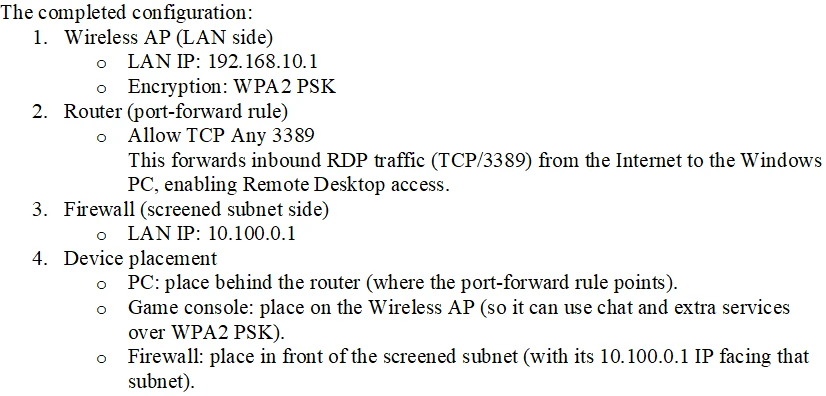
SIMULATION - You are configuring a home network for a customer. The customer has requested the ability to access a Windows PC remotely, and needs all chat and optional functions to work in their game console. INSTRUCTIONS - Use the drop-down menus to complete the network configuration for the customer. Each option may only be used once, and not all options will be used. Then, click the + sign to place each device in its appropriate location. If at any time you would like to bring back the initial state of the simulation, please click the Reset All button. Wireless AP LAN - Firewall Screened Subnet -Explanation
Question 2
Which of the following is the best way to distribute custom images to 800 devices that include four device vendor classes with two types of user groups?- A. Use xcopy to clone the hard drives from one to another.
- B. Use robocopy to move the files to each device.
- C. Use a local image deployment tool for each device.
- D. Use a network-based remote installation tool.
Explanation
The correct answer is: B. Use robocopy to move the files to each device..
At the scale of 800 endpoints with multiple hardware vendor classes and several user groups, the only practical method is a network-based remote installation tool such as WDS, MDT, SCCM, or Microsoft Intune Autopilot, which boots clients via PXE, applies vendor-specific drivers from a driver store, and selects task sequences keyed to user-group membership. Using xcopy to clone hard drives one by one is manual, ignores hardware abstraction and SID uniqueness, and does not scale. Using robocopy to move files is a file-copy operation, not an OS deployment mechanism, and cannot lay down a bootable image with the right driver injection. A local image deployment tool used per device removes the network advantage and again forces a per-machine touch that does not scale to 800 units. Driving the rollout from a centralized network-based deployment platform is the only choice that fits the scale and the differentiated targets.
Question 3
Which of the following is a Linux command that is used for administrative purposes?- A. runas
- B. cmcl
- C. net user
- D. su
Explanation
The correct answer is: D. su.
On Linux the command that switches the current shell to another user identity, most commonly to root for administrative work, is su (substitute or switch user); it is the classic privilege-escalation primitive on Linux and is paired with sudo for executing single commands as another user, with both being foundational tools for system administration. Runas is a Windows command that runs a program under a different user account and has no Linux equivalent name. Cmcl is not a real Linux administrative command and does not appear in any standard distribution. Net user is again a Windows command for managing local user accounts on the SAM database, not a Linux tool. Su, often combined with sudo, is the Linux command used to obtain administrative privileges in an interactive shell session.
Question 4
A help desk technician is setting up speech recognition on a Windows system. Which of the following settings should the technician use?- A. Time and Language
- B. Personalization
- C. System
- D. Ease of Access
Explanation
The correct answer is: D. Ease of Access.
Speech Recognition on Windows is grouped under accessibility tools because it lets users dictate and command the system without a keyboard, and the toggle and tutorial live under Ease of Access (Accessibility on Windows 11). Time and Language hosts language packs, region, date, and basic speech language settings but is not the location of the Speech Recognition feature itself. Personalization controls themes and visual styling. The System applet covers display, sound, notifications, and power but not Speech Recognition setup. Ease of Access is the area where the technician enables and trains Windows Speech Recognition.
Question 5
A user receives a new personal computer but is unable to run an application. An error displays saying that .NET Framework 3.5 is required and not found. Which of the following actions is the BEST way to resolve this issue?- A. Resolve the dependency through the "Turn Windows features on or off" menu.
- B. Download the dependency via a third-party repository.
- C. Ignore the dependency and install the latest version 4 instead.
- D. Forward the trouble ticket to the SOC team because the issue poses a great security risk.
Explanation
The correct answer is: A. Resolve the dependency through the "Turn Windows features on or off" menu..
.NET Framework 3.5 ships as an optional Windows component that is satisfied through the Turn Windows features on or off menu, where checking the .NET Framework 3.5 box pulls the payload from Windows Update or the install media and registers the runtime, which is the supported way to satisfy this dependency. Downloading from a third-party repository introduces tampering risk and is not how Microsoft components are installed. Ignoring the dependency and trying .NET 4 does not work because some apps explicitly require 3.5 side by side. Forwarding to the SOC is unnecessary because a missing optional Windows feature is not a security incident. Turning on the feature in Windows is the right resolution.
Other CompTIA A+ domains
- Operational Procedures (76 questions)
- Security (80 questions)
- Software Troubleshooting (92 questions)