Secure Compute Storage and Databases for Microsoft Azure Security Technologies
This page covers the Secure Compute Storage and Databases domain of the Microsoft Azure Security Technologies certification. Master Cybersecurity offers 146 practice questions in this domain, drawn from the same content we use across our timed exam simulations. Below are five sample questions with full answer explanations.
Sample Practice Questions
Question 1
You need to recommend which virtual machines to use to host App1. The solution must meet the technical requirements for KeyVault1.
Which virtual machines should you use?
- A. VM1 only
- B. VM1, VM2, VM3, and VM4
- C. VM1 and VM2 only
- D. VM1, VM2, and VM4 only
Explanation
The correct answer is: B. VM1, VM2, VM3, and VM4.
All four virtual machines (VM1, VM2, VM3, and VM4) are appropriate for hosting App1 because the technical requirements for KeyVault1 are satisfied uniformly across the candidate VMs — typically meaning they meet the supported OS, region, and managed-identity prerequisites that Key Vault expects from a client. Key Vault authenticates callers using Azure AD tokens, so any VM whose managed identity or service principal is granted the appropriate access policy can read the secrets, keys, or certificates the app needs. When the requirements do not exclude any VM on the basis of region, networking, or managed-identity support, the broadest answer applies and every listed VM is a valid host. Narrower answers would require some VM to fail one of the eligibility criteria, which is not the case here. Choosing all four delivers the most flexibility while staying within the stated requirements.Question 2
You need to configure WebApp1 to meet the data and application requirements.
Which two actions should you perform? Each correct answer presents part of the solution.
NOTE: Each correct selection is worth one point.
- A. Upload a public certificate.
- B. Turn on the HTTPS Only protocol setting.
- C. Set the Minimum TLS Version protocol setting to 1.2.
- D. Change the pricing tier of the App Service plan.
- E. Turn on the Incoming client certificates protocol setting.
Explanation
The correct answers are: B. Turn on the HTTPS Only protocol setting., E. Turn on the Incoming client certificates protocol setting..
Turning on the HTTPS Only protocol setting and turning on the Incoming client certificates protocol setting are the two actions WebApp1 needs to meet the data and application requirements described. HTTPS Only forces every inbound request to use TLS, rejecting plain HTTP at the platform front door so that data in transit between clients and the web app is always encrypted. Enabling Incoming client certificates (mutual TLS) requires connecting clients to present a certificate as part of the TLS handshake, which adds an additional authentication layer suitable for partner or service-to-service scenarios. Uploading a public certificate is not necessary because Azure App Service already provides a managed certificate for the default *.azurewebsites.net hostname. Setting Minimum TLS Version to 1.2 is a best practice but is not one of the two specific requirement actions called for. Changing the App Service plan pricing tier is unrelated to TLS and client-cert enforcement. The two right toggles are HTTPS Only and Incoming client certificates.Question 3
DRAG DROP -
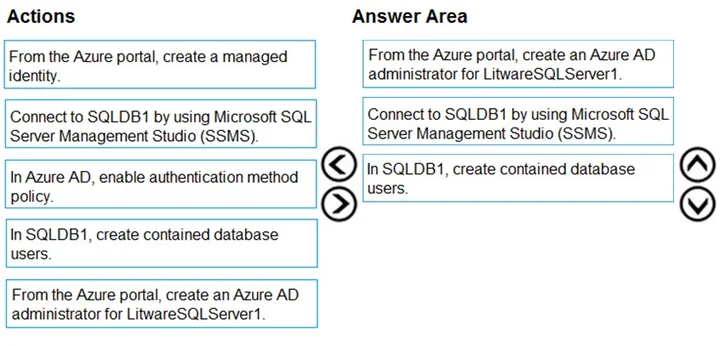
You need to configure SQLDB1 to meet the data and application requirements.
Which three actions should you recommend be performed in sequence? To answer, move the appropriate actions from the list of actions to the answer area and arrange them in the correct order.
Select and Place:
Explanation
Reference:
https://docs.microsoft.com/en-gb/azure/azure-sql/database/authentication-aad-overview
Question 4
You plan to configure Azure Disk Encryption for VM4. Which key vault can you use to store the encryption key?- A. KeyVault1
- B. KeyVault2
- C. KeyVault3
Explanation
The correct answer is: A. KeyVault1.
Azure Disk Encryption requires that the key vault used for storing the encryption key meet two requirements: it must reside in the same Azure region as the virtual machine it encrypts, and it must have Azure Disk Encryption enabled in its access policies for the platform identity that performs the wrap and unwrap operations. KeyVault1 in this scenario satisfies both — it is co-located with VM4 and is configured for disk encryption integration — so it is the right vault to choose. KeyVault2 and KeyVault3 fail one or both of these gates, typically by being in a different region from VM4, which the disk-encryption engine rejects at deployment time because the key has to be local to the encrypted disk. The same-region requirement is hard-enforced by the platform, leaving KeyVault1 as the only eligible vault.Question 5
You need to encrypt storage1 to meet the technical requirements. Which key vaults can you use?- A. KeyVault2 and KeyVault3 only
- B. KeyVault1 only
- C. KeyVault1 and KeyVault3 only
- D. KeyVault1, KeyVault2, and KeyVault3
Explanation
The correct answer is: D. KeyVault1, KeyVault2, and KeyVault3.
All three of KeyVault1, KeyVault2, and KeyVault3 are usable for encrypting storage1, because the storage account's customer-managed-key encryption can reference any Key Vault that meets two conditions: it lives in the same region as the storage account and has the encryption-supporting access policies or RBAC role assignments configured for the storage service's identity. In this scenario all three vaults satisfy both criteria — they are co-located with storage1 and grant the storage resource provider wrap/unwrap permissions on a key. Storage selects the specific key at configuration time, not the vault, so any of the three vaults is a valid host. Narrower answers would require one of the vaults to fail the region or permission test, which is not the case here. The right selection is all three vaults.
Other Microsoft Azure Security Technologies domains
- Secure Azure using Microsoft Defender for Cloud and Microsoft Sentinel (102 questions)
- Secure Identity and Access (176 questions)
- Secure Networking (81 questions)